ANR (Application Not Responding): The Silent Threat to Android User Experience
Learn what is ANR in Android and how to prevent app freezes using advanced ANR error monitoring, and android error monitoring for better performance.
ANR (Application Not Responding): The Silent Threat to Android User Experience
Application Not Responding (ANR) is one of the most disruptive issues Android users face. Unlike app crashes that provide immediate feedback, ANRs place the app in an unresponsive state, leaving users uncertain whether the app is still functioning. For Android engineering teams, understanding what is ANR in Android, along with how to detect and prevent it, is essential for delivering a reliable and high-performing application experience.
ANRs present a serious challenge in mobile app development, directly affecting user satisfaction, retention, and key business metrics. To address these issues effectively, teams must rely on strong android error tracking, proactive performance optimization, and robust android error monitoring strategies. In modern Android development, preventing ANRs is a critical component of overall app quality assurance.
Mobile App Development Context for ANRs
In today's fast-evolving mobile ecosystem, ANRs introduce challenges that differ significantly from traditional crash scenarios. While crashes clearly signal failure, ANRs result in frozen screens with no immediate indication of what went wrong. This ambiguity makes ANR debugging and ANR monitoring particularly difficult for Android development teams.
Key Mobile Development Considerations
- App performance degradation impacts mobile user retention more severely than desktop environments
- Users expect near-instant responsiveness, making Android's 5-second ANR threshold feel excessive
- Effective background task management is crucial in resource-constrained mobile devices
- Performance monitoring must account for device fragmentation and varying network conditions
For engineering teams, preventing ANRs requires a comprehensive approach that combines proactive optimization, real-time ANR monitoring Android Auto scenarios, and deep diagnostic insights.
What Is ANR in Android Apps?
ANR stands for Application Not Responding and occurs when an Android app fails to respond to user input within a defined time frame. When this happens, the Android system displays a dialog asking the user whether they want to wait or force close the app.
Typically, an ANR is triggered when the app performs long-running operations on the main thread, also known as the UI thread. The UI thread is responsible for processing user interactions, updating interface components, rendering layouts, and handling system events.
When tasks such as network requests, disk I/O, or intensive computations block the UI thread, the app becomes unresponsive. Understanding what is ANR in Android and identifying these blocking operations is key to preventing performance issues.
To avoid ANRs, developers should offload heavy tasks to background threads and use asynchronous APIs such as Coroutines or other concurrency mechanisms. Proper exception handling and responsive UI design are also essential to reducing ANR occurrences.
Reasons for ANR in Android Apps
Long-Running Operations on the Main Thread
Executing network calls, disk access, or complex calculations on the UI thread can block user interactions and trigger ANRs.
Deadlocks and Race Conditions
When multiple threads compete for shared resources, deadlocks or race conditions may occur. These scenarios can cause apps to freeze unexpectedly, making them difficult to detect without advanced ANR error monitoring and android error monitoring solutions.
Unresponsive UI Components
UI elements that fail to update or respond—due to infinite loops, blocking calls, or unhandled exceptions - can lead to ANRs and degrade the user experience.
Slow I/O Operations
Reading or writing large files synchronously can block the main thread. Asynchronous I/O and background processing help mitigate this risk.
In summary, ANRs can arise from multiple causes, including threading issues, UI bottlenecks, slow operations, and memory-related inefficiencies. Effective prevention requires disciplined coding practices, proactive android error tracking, and continuous performance monitoring.
How to Use ANR Reports to Fix Issues in Android Apps
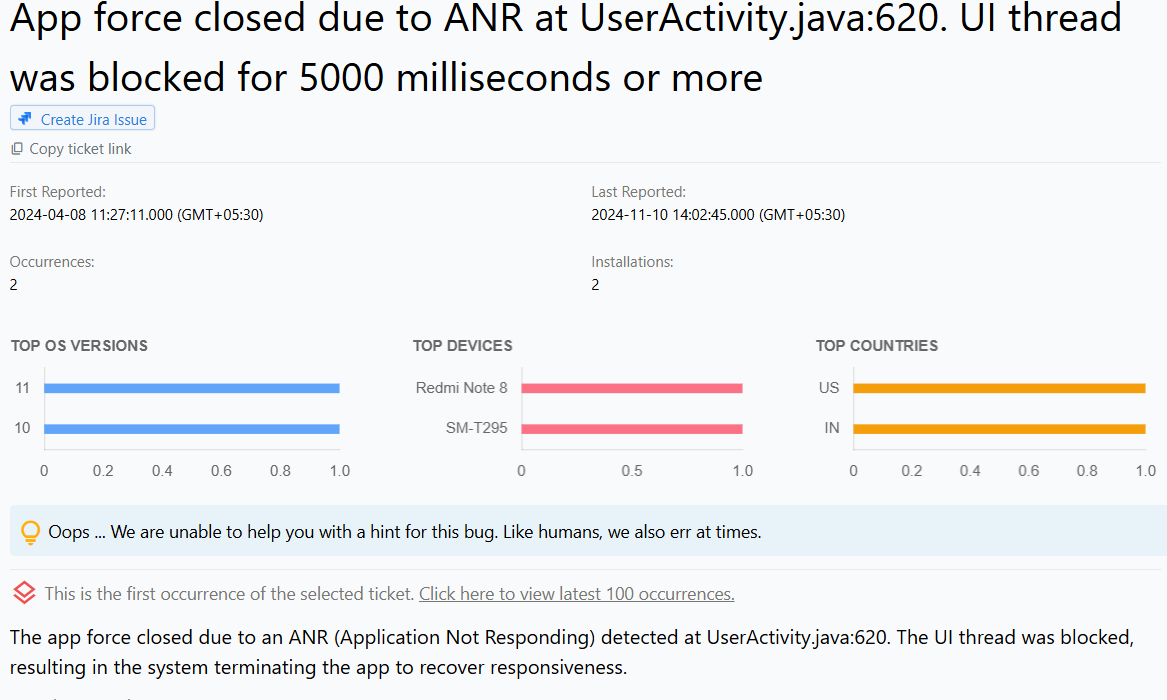
ANR issue reports provide valuable diagnostic data, including stack traces for the UI thread and related background threads. The UI thread stack trace highlights the exact code path that caused the app to become unresponsive.
In addition to stack traces, the activity trail offers a chronological sequence of events leading up to the ANR. This context allows developers to understand user behavior, identify performance bottlenecks, and apply targeted fixes using advanced ANR monitoring tools to improve app stability and responsiveness.